pubsub_bigtable
PubSub to BigTable - Piping your Data Stream in via GCP Cloud Functions
ETL Pipeline - PubSub/BigTable
This is an expermental/example pipeline for backend data migration of event data to a long-term (performance ) database. The objectives of this project are to:
- Demonistrate the ingestion of event data via PubSub
- Utilize basic read/write funcionalities in BigTable
- Establish that such a pipeline can be used to deliver real-time analytics effectivly
- Demonistrate the use of “infrustructure as code” by utilizing Serverless Framework
- Create a functioning simulator to be used in testing
- TODO: Build integrated CI with unit and end-to-end testing (utlizing the simulator)
Getting Started
This service utilizes the Serverless Framework setup for resource management. For comprehensive information vist the info page.
TLDR version:
Initial Deployment
1) Install serverless and verify
npm install -g serverless
serverless --version
2) Install the GCP plugin
npm install --save serverless-google-cloudfunctions
3) Download credential files and place them in your home directory with the naming convention of “~/PROJECT_NAME.json” 4) Deploy service Note: STAGE_NAME can be: [‘dev’, ‘test’, ‘prod’]
sls deploy --stage STAGE_NAME --project PROJECT_NAME
Note: --stage and --project are optional parameters
Updating Service / Redeploy
After changes have been made to the service an “update” can be preformed to deploy those changes to the cloud. To preform the update run the same deployment command as before (and the Serverless Framework will handle the rest).
sls deploy --stage STAGE_NAME --project PROJECT_NAME
Note: --stage and --project are optional parameters
A service update has two key charristics: 1) Data in the DataBase (BigTable) will not be deleted 2) It will (generally) be faster than a full deployment
Deleting/Removing Service
If a service needs to be removed use the following command:
sls remove
WARNING: Removing a service will delete everything in the databases (BigTable)
Resetting DB/ Removing Data from Tables
While most data stores allow for deletion of data on an entry by entry basis, the fastest way to drop a table from BigTable is to remove the service and redeploy it.
sls remove && sls deploy
WARNING: This will remove ALL the tables and data from BigTable
Running the Simulator
After deploying the service the simulator can be run at anytime inside the dev and test enviorments. The simulator can not be run in the production enviorment
The simulateAccesoData function is tied to an http trigger. To begin the simulation run the following command from the terminal.
curl --header "Content-Type: application/json" \
  --request POST \
  --data '{"limit": 10, "speedFactor": 120}' \
  https://us-central1-empack-238417.cloudfunctions.net/simulateAccesoData_dev
NOTE: The above example runs in the dev enviorment inside the project empack-238417 in the region us-central1. To modify any of these variables see the framework below:
curl --header "Content-Type: application/json" \
  --request POST \
  --data '{"limit": NUMER_OF_EVENTS, "speedFactor": VELOCITY_OF_SIMULATION, "project": PROJECT_NAME}' \
  https://REGION-PROJECT_NAME.cloudfunctions.net/simulateAccesoData_STAGE_NAME
NOTE: The above example runs in the dev enviorment inside the project empack-238417 in the region us-central1. To modify any of these variables see the framework below:
curl --header "Content-Type: application/json" \
  --request POST \
  --data '{"limit": NUMER_OF_EVENTS, "speedFactor": VELOCITY_OF_SIMULATION, "project": PROJECT_NAME}' \
  https://REGION-PROJECT_NAME.cloudfunctions.net/simulateAccesoData_STAGE_NAME
Pipeline Definition
The current pipeline setup is as seen below:
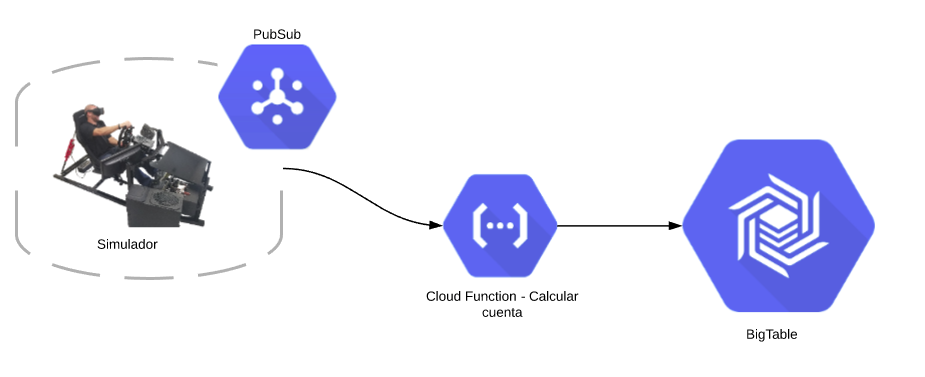
Looking forward, future architectures could include:
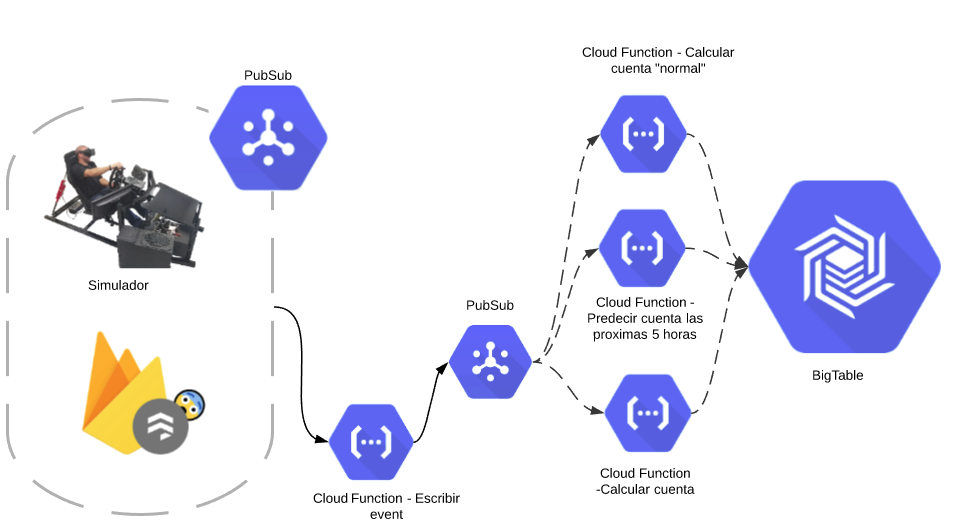
Why the are the Escribir Event and Calcular Cuenta functions together in the Current pipeline but seperated in the Going Forward version?
- Seperating them allows for a “Fan-out” to be applied to all calculations done for the service. It also allows for best fault tolerance. In the Going Forward should the
Calcular Cuentafail the event will still be writted to BigTable. In the current setup that is not guaranteed.
Why use “Fan-on”? Why not run everything in one function?
- The “Fan-out” method provides better fault tolerance. If one of the calculations fails the others will still write to BigTable.
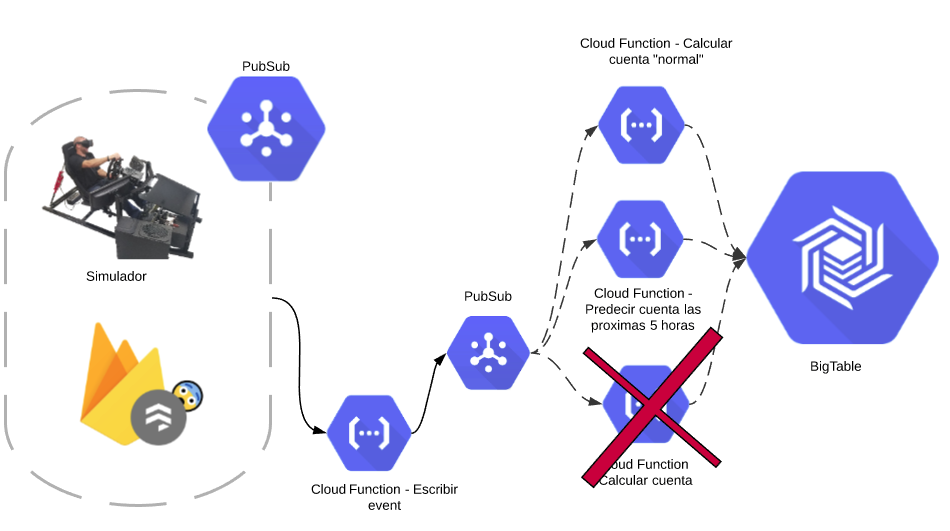
Why have two PubSubs? Why not attach the calculation functions to the same topic as Escribir Event?
- Having seperated PubSub topics guarantees that the row exists in BigTable before the calculation functions attempt to write to it.
Table Definition
Use Cases
A BigTable pipeline is best suited for a non-transactional, High-volume data flows where access patterns are predictable.
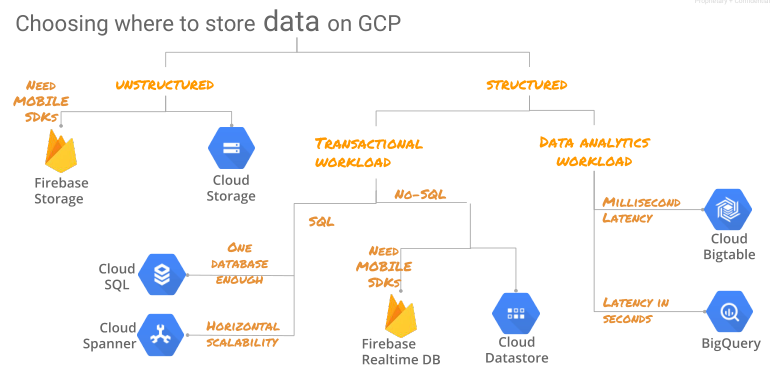
The schema for the current DB is:
- InstanceId: iotincoming
- Table: incomingraw_STAGE_NAME
- Column: event
- service
- eventTime
- event
- Column: realTimeStatus
- currentOccupancy
- writeTime
- Column: event
- Table: incomingraw_STAGE_NAME
Function Definitions
simulateAccesoData
- Input: request object containing:
- JSON/Dict Containing:
- limit: Number of events to simulate
- speedFactor: Speed at which to run simulation. Example: 60 is an hour’s worth of data in 1 minute
- project: Project Name (used for creating topic if non-existent)
- JSON/Dict Containing:
- Actions Executed:
- Event data published to PubSub topic
- Return:
- Text reporting # of events excueted
pubSubReciever
- Text reporting # of events excueted
- Input: topic message from PubSub containing:
- JSON/Dict Containing:
- eventTime: timestamp for event
- event: The message received from IOT (1 if person entered, -1 if person exited)
- service: name of IOT
- JSON/Dict Containing:
- Actions Executed:
- Event data written to BigTable (event)
- Current count of persons in site calculated and written to BigTable (realTimeStatus)
Troubleshooting
It’s common when deploying the service to a new stage to see the following error:
 {"ResourceType":"gcp-types/bigtableadmin-v2:projects.instances.tables",
 "ResourceErrorCode":"404",
 "ResourceErrorMessage":
        {"code":404,
            "message":"Instance projects/empack-238417/instances/iotincoming not  found.",
            "status":"NOT_FOUND",
            "statusMessage":"Not Found",
            "requestPath":"https://bigtableadmin.googleapis.com/v2/projects/empack-238417/instances/iotincoming/tables",
            "httpMethod":"POST"}}
If you navigate to the GCP Console > Deployment Mangement > SERVICENAME (in this case “etlservice”) you will see a move detalled error description.
In the case mentioned above the issues is that the BigTable instance has not finished deploying before an attempt is made to create the table. The solution is to repeate the sls deploy command.
If you execute sls deploy and encounter the following error it’s because the deploy process hasn’t finished for your previous execution. The solution is to wait a minute of two and try it again.
If you would like to monitor the progress of your deployment (to know when the service will be unlocked for a redeploy) you can access it in the console at GCP Console > Deployment Mangement > SERVICENAME
 Resource 'projects/empack-238417/global/deployments/sls-etlservice-dev' has an ongoing conflicting
 operation: 'projects/empack-238417/global/operations/
 operation-1565034163266-58f63e95ce2b2-26e14098-59e4c635'.